TL;DR:
Tailwind CSS vs. custom CSS is a comparison that almost every frontend developer comes across sooner or later. Tailwind gives you a fixed vocabulary of utility classes so you style directly in your markup. Custom CSS or traditional CSS gives you a blank canvas and full control over how your styles are organized. Much of the discussion around Tailwind CSS comes from one recurring question: “Is Tailwind CSS just inline styles with extra steps?” Once you understand the answer, the rest of the discussion around readability, control, performance, and custom CSS becomes much easier to follow.
- Tailwind isn’t inline styles. It follows a consistent design system.
- Writing less CSS doesn’t mean writing less styling.
- Most Tailwind projects still use a small layer of custom CSS.
- Custom CSS offers freedom, but requires more maintenance.
- Utility-first changes your workflow more than it changes traditional CSS itself.
As Tailwind CSS became more popular, comparisons with custom CSS naturally became more common too. Both approaches solve the same problem, but they encourage developers to think about styling in different ways. Because of that, discussions around Tailwind CSS often go beyond syntax and tooling, touching on topics like HTML readability, design consistency, performance, and long-term maintainability.
This isn’t another feature comparison article. There are already plenty of those. Instead, this article looks at the ideas behind the most common debate – Tailwind CSS vs. custom CSS. It examines where that perception comes from and what actually changes when you build with one instead of the other. Once that becomes clear, many common questions about both approaches become much easier to answer.

So, is Tailwind CSS the same as inline styles?
At first glance, the comparison seems reasonable. Both approaches let you style an element directly without creating a custom CSS class first.
The short answer is no. The difference comes down to one thing – inline styles are open-ended & unpredictable, and Tailwind’s classes are pulled from a fixed, reusable system.
Why Tailwind feels like inline styles
Consider this Tailwind markup:
<div class="flex items-center justify-between gap-4 rounded-lg p-6">To someone seeing Tailwind for the first time, this can easily look like plain CSS properties embedded directly in HTML. That’s why it’s easy to assume Tailwind is just another form of inline styling.
Traditional CSS usually starts with a name.
.card { ... }

.card-header { ... }

.card-title { ... }
You create a class, switch to your stylesheet, define the rules, then come back to your markup & apply the class. For many projects, that naming layer consumes more time than people realize. Teams debate whether something should be called .feature-card, .card-feature, or .service-card, even though each name ultimately represents the same visual pattern. Tailwind follows the utility-first workflow and skips that naming step. Instead of creating a class first and styling it later, you apply predefined utility classes directly to the element. The styling doesn’t disappear. Tailwind simply removes the naming layer between deciding on a style and applying it.
The structural difference
The bigger difference isn’t where the styles appear. It’s how they’re managed.
Inline styles are written directly with the style attribute. Every value is defined manually, making them harder to reuse across a project. They also don’t naturally support responsive breakpoints or interaction states.
Tailwind takes a different approach. Instead of writing every value yourself, you compose your UI with predefined utility classes. Those utilities come from a shared design system with consistent values for spacing, typography, colors, and sizing. They also support responsive variants like md: and lg: and state modifiers like hover: and focus:.
The separation of concerns didn’t disappear. It simply shifted. Instead of separating HTML and CSS into different files, Tailwind organizes styling through a shared system of utility classes that still compile into regular CSS. The difference is that you’re composing interfaces from a predefined system instead of writing every rule yourself.
Tailwind CSS vs. Custom CSS: Understanding The Trade-Offs
Once developers understand that Tailwind is not “inline styles,” the conversation usually shifts to the trade-offs. Some are real. Some are exaggerated.
Readability and maintainability
This is one of Tailwind’s most discussed trade-offs. A component with fifteen utility classes is undeniably harder to scan than a single .card class.
However, long utility lists often mean an element has become reusable. In component-based projects, those classes are typically moved into reusable components, making the surrounding code much easier to read. Modern editor tooling, such as class sorting, autocomplete, and formatting, also makes them easier to work with.
Custom CSS doesn’t remove complexity. It simply moves it into your stylesheet. Instead of reading utility classes in your markup, you’re switching between HTML and CSS to understand how a component is styled. The complexity stays the same. It’s simply organized differently.
Freedom comes with more responsibility
Traditional CSS offers you complete freedom, but it also means every styling decision is yours to make and maintain. As the project grows, keeping those decisions consistent becomes increasingly challenging.
Tailwind takes a more opinionated approach. Its predefined spacing scale, color palette, and utility system help teams build more consistently without having to make the same design decisions repeatedly.
That doesn’t make custom CSS irrelevant. It’s still the better choice for:
- Complex keyframe animations
- Advanced selectors and pseudo-elements
- Third-party library overrides
- Print styles
- Highly customized brand experiences
These aren’t limitations of Tailwind. They’re simply use cases where plain CSS remains the more practical tool.
Performance beyond bundle size
By now, you might be wondering, “Is Tailwind really better for performance?”
Performance discussions often focus on CSS bundle size, but that’s only part of the picture. A few years ago, that concern carried more weight. Today, modern Tailwind builds generate only the utility classes your project actually uses, leaving unused utilities out of the production CSS.
Custom CSS can produce small, fast stylesheets too, but only if unused styles are consistently cleaned up. In long-running projects, old selectors often survive long after the components that needed them have disappeared.
In the end, neither approach guarantees better performance. Tailwind simply makes it easier to avoid unnecessary CSS by default.
When each approach makes sense
There isn’t a single right answer. The best choice depends on your project, your team, and the kind of UI you’re building.
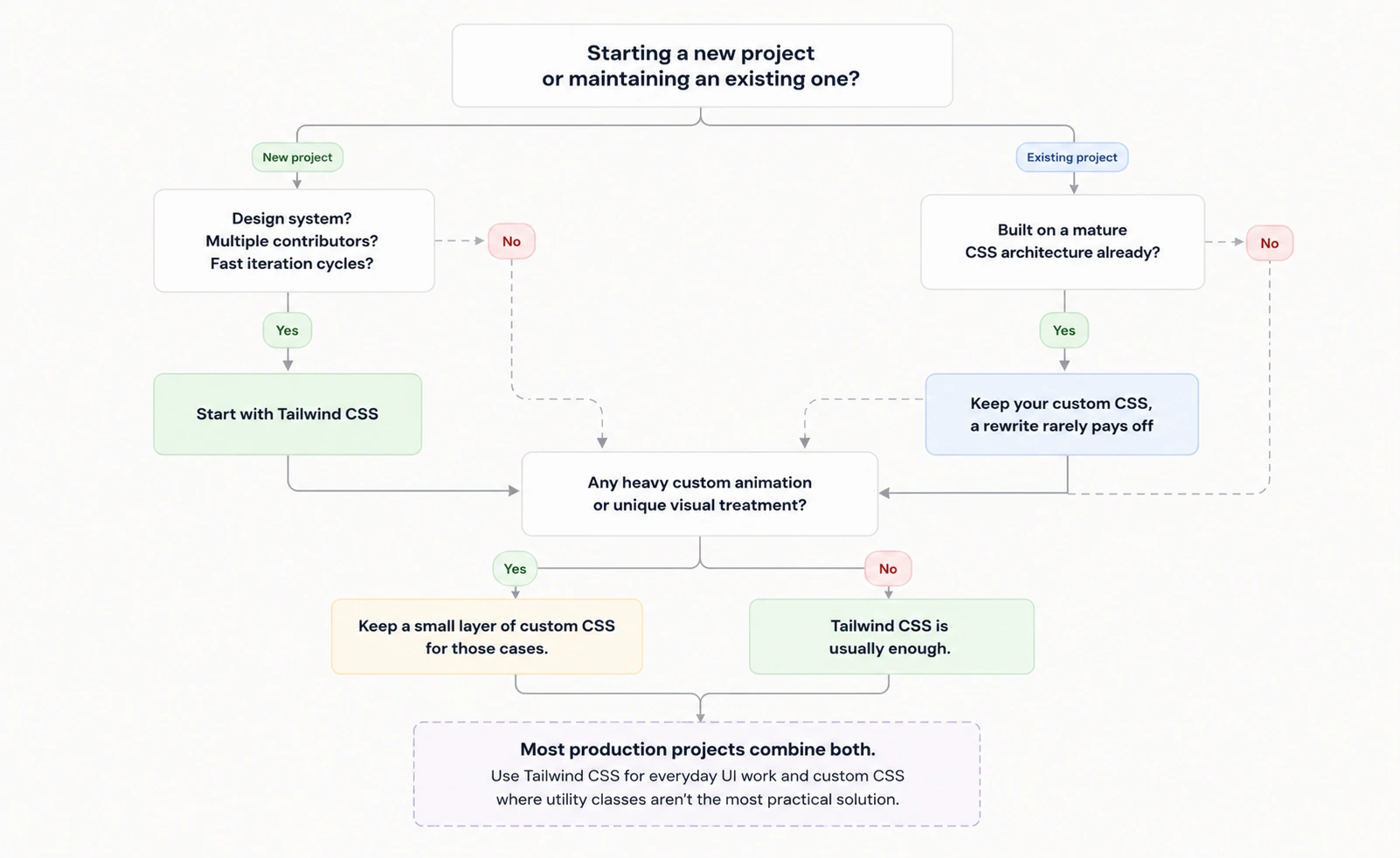
The flowchart simply highlights the most common decision paths. In practice, many production projects use both Tailwind CSS and custom CSS. Tailwind handles everyday UI work, while custom CSS is reserved for cases where utility classes are no longer the most practical solution.
The bottom line
Choosing between Tailwind CSS and custom CSS isn’t really about which technology is better. It’s about deciding how much structure you want your styling workflow to provide. Custom CSS offers complete freedom, while Tailwind encourages a more consistent, predefined workflow from the start.
Additionally, Tailwind doesn’t replace traditional CSS. It simply changes where most of your CSS lives and, more importantly, how you think about writing it.
Happy coding!
Frequently Asked Questions
Can I add Tailwind to an existing custom CSS project?
Yes. Tailwind can be introduced gradually alongside your existing styles without requiring a complete rewrite.
Do I still need to learn CSS before learning Tailwind?
Absolutely. Tailwind doesn’t replace CSS knowledge. Understanding layout, positioning, Flexbox, Grid, and the cascade still makes Tailwind significantly easier to use.
Does Tailwind make HTML harder to read?
It can, especially in larger components. However, component-based development, editor tooling, and consistent utility patterns usually reduce that complexity over time.